The article on "How To Get Email Alerts on Mobile Phone" is a Guest Post by Prashanth Singh Rathore,if you want to write a Guest Post for All Tech Buzz-Tech Tips and Tricks then contact us.
Gmail is the fastest growing email services and has one of the best spam fitters.There are many features of google like
1.Google Maps.
2.Gmail provides faccility to store upto 7+gb memory.
3.You can get your own domains for business like yourdomain@domain.in for more details go to this link.
4.Additional chat emotions which are not enabled by default but we can activate them from Gmail labs.
5.Now you can get your Daily Gmail Alerts to your Mobile Phone when you get an email in inbox it automatically sends to your mobile phone.


4.Now just log in to your gmail account and go to Mail settings.


 PSR
PSR
Gmail is the fastest growing email services and has one of the best spam fitters.There are many features of google like
1.Google Maps.
2.Gmail provides faccility to store upto 7+gb memory.
3.You can get your own domains for business like yourdomain@domain.in for more details go to this link.
4.Additional chat emotions which are not enabled by default but we can activate them from Gmail labs.
5.Now you can get your Daily Gmail Alerts to your Mobile Phone when you get an email in inbox it automatically sends to your mobile phone.
Steps To Get Gmail Alerts On Your Mobile Phone:
1.Go to way2sms.com.Sign up over a account there if you dont have.Now login to your way2sms account.
2.After login in just click on Mail Alerts.
3.There just copy your way2sms id like 569856@waytosms.
4.Now just log in to your gmail account and go to Mail settings.
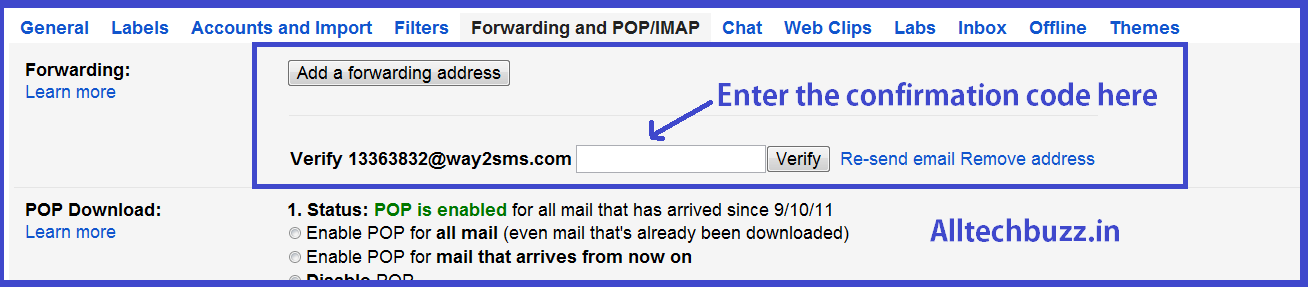
5.In Mail Settings go to forwarding and pop\imap.
6.After that click on Add forwarding address.
7.In the text field paste your waytosms id.
8.Then click on next button.
9.A verification code will send to your way2sms id or to Phone.Enter the confirmation code in Gmail Forwarding and POP/IMAP.
10.You can also stop receiving the mails alerts at any time by going to forwarding and pop/imap tab and select disable forwarding.
Hope that you liked this article for more Tips and Tricks keep visiting.
PSRAbout the Guest Author:
This article is provided by Prashanth Singh Rathore who writes on Latest Gadgets,PC Tips and Tricks etc.You can find him on Facebook.


