Showing posts with label Search Engine Optimization. Show all posts
Friday, February 6, 2009

Optimize blog and post title for search engines

0 comments


When Blogger blogs are listed in the SERP (search engine result page), the default is the blog title is displayed first followed by the post title. See screen shot below:

blog title post title in search engine result page
This is bad especially if the blog title is long, the post title may be truncated. It is better to have the post title first before the blog title like the screen shot below:

search engine result page post title before blog title

In the above case, the post title is displayed first and the blog title is nowhere to be seen. Having the post title displayed first will result in better click through rate from search engines.

Note that had the blog title been as long as the post title you see in the above, the post title would have been obscured, not visible. Even if the blog title did not obscure completely the post title but is before the post title, this will result at less hits (traffic) from search engines. It is also bad for SEO (search engine optimization). It is thus advantageous to have the post title displayed first followed by the blog title.

I tested a hack I found at Optimize Blog Title for Search engine Results and increase visitors on this blog yesterday, Friday 6 February, 2009. I recorded the test at Testing SEO tip - post title and blog title in search engine result page. It will take some time before the change is indexed by the search engines.

And today, one day later, I found the very first search engine result which have the post title displayed before the blog title. Google for countdown for blog and see for yourself or refer to the screen shot below:

search engine result page post title before blog title

Note that the result is displayed as Countdown clock for blog: Blogger Tips and Tricks with the post title displayed first followed by the blog title.

Footnote: I discovered the above by examining the "Recent Pageload Activity" in Statcounter visitor counter statistics. This is one of the thing you can gain from installing a visitor counter. Note that not all the results will have this feature. Some not re-indexed by search engines will not have this feature and it will take time before the rest will display the same. How long I do not know but will continue to check the statistics in my visitor counter

Related posts: Post title SEO

Update: Received a comment "yOUR new custom domain is not configured good. Link http://www.bloggertipsandtricks.com/2009/02/seo-tip-increase-traffic-display-post.html took me on the google aps page."

The commentator is right. It was only yesterday I converted to custom domain. It will take a few days for the conversion to complete.
Continue reading →
Wednesday, February 4, 2009

Hyphen in blog URL - good or bad?

0 comments
In a 3 year old post How to build traffic to your blog, I have mentioned that it is good for SEO (Search Engine Optimization) to include key words in the blog URL and that search engines cannot distinguish between words in a compound word like for example http://bloggerfordummies.blogspot.com. This I learned from WebCEO. I got to thank a reader whose blog is Inside that ad who asked about changing the blog URL to include hyphen whose motivation to change was that old post. I am grateful that he has drawn my attention to that post which reminded me that I need to do an update on that post. I got to state here that what WebCEO taught is not true because you can try to google, for example, blogger for dummies, and you will see in the results page that the 3 words are highlighted (bold). this showed that search engines can separate out words in words combined into a single compound word. Thus if you have something in your current URL similar to bloggerfordummies, do not try to change the blog URL especially if it is an old blog as you will get dead links and will have to start all over again. I for one will only change to something like blogger-for-dummies only if bloggerfordummies had already been taken but I still want the words blogger and dummies in the blog URL.

One further thing. There are people who said that 1 or 2 hyphens may be OK but more than that, the URL becomes spammy.

Peter Chen's nice graphic signature
Continue reading →
Friday, December 12, 2008

Words ignored by search engines

0 comments
A previous post SEO with post title mentioned that certain words are ignored by search engines. That elicited a request from a blogger what words are ignored by search engines. According to a compilation by Tsu Dho Nimh, some 655 words are ignored. Here is a sample beginning with a:


a able about above abroad according accordingly across actually adj after afterwards again against ago ahead ain't all allow allows almost alone along alongside already also although always am amid amidst among amongst an and another any anybody anyhow anyone anything anyway anyways anywhere apart appear appreciate appropriate are aren't around as a's aside ask asking associated at available away awfully

Peter Chen's nice graphic signature
Continue reading →
Wednesday, November 5, 2008

SEO tip: upload images whenever you can

0 comments
hits from image searches

Small SEO tip - upload an image or images to your blog post whenever you can. Why? I have visitor counters in practically all my blogs and occasionally check them to find out where my visitors are coming from. It is not infrequent that I find hits from image searches. For example, look at a portion of today's hits to Natural Remedies. Of the first 4 hits, 2 (50%) are from image searches.

I am not suggesting that you will get lots of hits from image searches, but I am pretty sure you will get at least some. In fact, in some of my very low traffic blogs, more than 50% of the hits were from image searches. However, to balance things out, this is the highest traffic blog that I have, but I don't get anything even near to 50% of the hits from image searches. I do get at least some from image searches, and for that, I am very grateful.

So if you want hits from search engines, do upload or include (<img>) images whenever possible. Do remember also to complete the alt="" attribute as search engines cannot read images but they do read the text you put in between the quotation marks "" of the alt="" tag.

However, just so that you do not get too high an expectation, how many hits from image searches will depend on the type of blog you have and its Page Rank.


Peter Chen's nice graphic signature
Continue reading →
Thursday, June 5, 2008

Permalink SEO Individual Post URL Search Engine Optimization

0 comments

Cardinal rule of SEO (Search Engine Optimization)

The first cardinal rule of SEO (Search Engine Optimization) is, put key words into:

  1. blog or website URL

  2. blog title

  3. individual post URL (permalink)

  4. individual post title


Now one you have created your website or blog, its URL is pretty much fixed. I would be very reluctant to change the URL of a blog as that would mean dead links plus you would be starting from scratch as far as search engines are concern. That leaves the individual post URL or permalink plus the post title.

Previously, with the old classic Blogger, if after publishing a post you change the post title or date, the post URL would also change. That was why I was very very reluctant to change the post URL once it is published. Those bad old days are over. Now with the new improved Blogger, after publishing a post, changing either the post title or the date or both will not change the post URL.

You can make use of this fact to do some SEO using the title. Remember it is good to get keywords into both the post title and post URL remembering that once published, a post URL is fixed, constant. I make use of this by publishing a post twice, once with whatever key words I want in the post title without any words ignored by search engines and without worrying too much about whether it is understandable or not. (words ignored by search engines are words like a, of, the, etc.) After publishing and getting these key words into the post URL (permalink), I can then edit the post title to whatever I want without worrying that the post URL will change.

Take this example - Types of blogs: business blog to promote online merchant. Its original post title was "Types blogs business promote online merchant", not a perfect post title but without words like of, to, etc., all of which would be ignored by search engines. Below is a screen shot of the post as it was originally published:

Post on business blogs with original title

http://adsense-alert.blogspot.com/2008/06/types-blogs-business-promote-online.html


The last part of the post URL contains the words

types-blogs-business-promote-online

After publishing and getting the post URL established, I can now change the post URL to whatever I want and the above URL will not change. In fact, I changed the post title to "Types of blogs: business blog to promote online merchant", with superfluous (to search engines) of, to, in the post title to make it more readable than the original. Below is a screen shot of the post with the URL unchanged but with a new, readable post title:

post on business blog with new post title

Note that the post URL remains the same:

http://adsense-alert.blogspot.com/2008/06/types-blogs-business-promote-online.html


Peter Chen's nice graphic signature

Related posts: Search engine friendly permalink (individual post URL)
Continue reading →
Wednesday, December 26, 2007

Increase traffic: participate in rssHugger

0 comments
Through my activities in an an Environmental blog: Enviroman Says and my activities in Freecycle, campaign to keep usable items out of the landfills, I have come across TreeHugger, a very popular environmental site.

Now here comes rssHugger, a site that helps bring visitors to your blogs and surfers find blogs on subjects that they are interested in. rssHugger says they use the power of the environmentally friendly Internet and viral marketing to bring blog authors and blog readers together.

How does rssHugger works to bring about the above objectives? Truthfully speaking, I do not know yet. But I am a retired scientist, and scientists do experiments and research. That is what I am going to do. I will experiment with rssHugger and now after a long absence from my account with Statcounter, I will now have to start checking this blog statistics again.

Just in case some of you get uneasy about my mention of Statcounter, a free visitor counter, I would like to assure you Statcounter is only a hit counter which track hits to a website by putting cookies into your computer plus get information about what screen resolution, operating system, web browser, IP address of the visitors. It does not collect any personal identifiable details like your name, home address, etc., and is not a spyware although some time ago, its cookies are identified as spyware cookies by AdAware. I believe they have stopped that now as
AdAware have finally come to the conclusions cookies from Statcounter are not spyware cookies.

How does one gets to participate in rssHugger? You either write an honest review of rssHugger on your blog like this one or pay a one time review fee of $20 for participation of 10 years. I am afraid I am a pensioner who still have a son to put through college on my pension plus by nature, is a penny pincher. So here is the review which unfortunately is not much of a review as I am not in the program yet. The owner of rssHugger will personally check your blog for quality before accepting your blog into the program as he obviously is interested in quality, not quantity.

As I am keen to do this test, I have to make sure that this blog gets accepted into this interesting first ever program. I will thus have to somehow convince him this is a quality blog. I want to bring to his (and any other visitors) attention to the fact that this blog got listed in DMOZ, the most important directory (click BACK button to get back to this page) and the hardest to get listed, and this was without even submitting the blog to DMOZ. And the human editor who did this is not the only one who are of the opinion that this blog in very informative. You can check what grateful bloggers says about Blogger Tips and Tricks (click BACK button to get back to this page). By the way, that compilation was not compiled to boast, but the reason is given right at the top of the post.

Well, if this blog gets accepted into rssHugger, I will then have to update this post with some statistics, etc. Let's see how it goes.

Peter Chen's nice graphic signature
Continue reading →
Sunday, December 9, 2007

PageRank downgraded or unranked: What to do.

0 comments
Let's address the second question first. All now website start with no PageRank. It is also probably not indexed. See Check if your website is indexed and how to get it indexed. For those who are in a hurry, see Fastest way to get indexed by search engine.

Your website may also be black listed by search for practicing Black Hat SEO (Search Engine Optimization) such as making text invisible by making the font color same as background.

A blogger complained his blog's PageRank has been downgraded to unranked. There can be various reasons why a website's PageRank may be downgraded. One of them is what they call the "Google Dance". Google changes its algorithm and some websites may get their PageRank increased, some downgraded, some downgraded very badly. I am not aware of anything we can do about this, unless you know the inner workings of Google search engines which they will NEVER reveal.

Or perhaps, you can. Check Google Webmaster Guidelines and see if you are complying with their guidelines.

After ensuring your website complies with their guidelines, if you don't already have a Google sitemap for your website, add Google sitemap (click BACK button to get back to this page) to your website, then go to Google Webmaster Tools, click "request reconsideration", select "request reconsideration", select the website if you have more than one, submit request, then pray hard.

Recently, I read that Google has downgraded blogs which participate in "Pay per post" to ZERO (0). I heard too that those who have Text Link Ads on their websites got their PageRank downgraded.

NOTE: Some sites recommend adding rel="nofollow" attribute to the <a> hyperlink tag that someone paid you to add to your blog, and then asking for reconsideration. This will probably work. Each person have their own views about what is right and wrong, but my view is that if someone paid you to put that link and you add that rel="nofollow" attribute to get your PageRank up again, I think one should inform the person who paid for the link and see if they agree or have some feedback. But of course don't take this as me telling you what you should do.

Peter Chen's nice graphic signature
Continue reading →
Sunday, April 22, 2007

Another way to bring more traffic to your blog and improve your PageRank

0 comments
I have a Paypal account. Unfortunately in my country, I can't withdraw funds from my Paypal account. In order to do that, I need a US Bank. I did a search for ways for non-US residents to open US bank account using the searh terms "non-resident US open US bank account" and the first result was a page which is a hubpage created at Hub Pages. I figured that if someone can create a hub page and have it so easily found by search engines, I can also make a hub page to help publicise my blogs. So I signed up for an account and created two hub pages:

Help for bloggers using the Google Blogger platform for their blogs

and

Environmental Blogs.

Let's hope that these pages will also appear high in search engine result pages and bring more traffic to my blogs. Plus in the hub pages, I have created links to my blogs, and I suppose that will help in my PageRank.

Hope over to Hub Pages to sign up for an account and create your own hub pages, and probably that will help bring more traffic to your blogs and increase your blogs PageRank.
Continue reading →
Tuesday, December 19, 2006

SEO tools for a blog post (Overture and WebCEO)

0 comments
I have published a post, How to build traffic to your blog and among the recomendations were to use WebCEO, a free SEO (Search Engine Optimization) tool which comes with free tutorials on SEO (there is also a paid version) and Overture Keyword Suggestion Tool for keywords suggestions and research. WebCEO also have a WebCEO "University" which you can join to gain knowledge of SEO (Seach Engine Optimization), all for free (minus the frills). You will have to pay if you want the extras.

I will outline here how I try to use the above mentioned tools to do some elementary SEO for a post regarding stroke and a first hand account from a brain scientist, Bolte Jill Taylor about what she observed as she suffered through the stroke and her subsequent recovery: Stroke Rehabilitation: A brain scientist stroke victim and survivor advice to stroke victims and caregivers. More can be done than what I am going to do, but with the limited time I have, I would rather focus more on content than SEO which can be a time consuming activity. If you want to do SEO in greater details, it will be good for you to go through the lessons (free for most of it) at WebCEO University (close new window/tab to get back to this page).

Overture

The post will be above stroke. The very first step is to try to get some other keyword suggestion for the post I want to write which can be incorporated into the post. I first go to Overture and type in the word stroke to see what keyword it generates and the number of times the term was searched for. This was the result:


Searches done in November 2006
COUNTSEARCH TERM
69645stroke
11696stroke symptom
1635stroke treatment
1327cause of stroke
1242stroke recovery
1166stroke rehabilitation
443stroke victim
382stroke rehab
348stroke survivor
25bolte jill taylor
14822caregiver
127brain scientist
No suggestionsneuroanatomist


The last four was not from the first search, but was from other searches using different search terms because I anticipate that I have to incorporate them into the post. Anyway, since I will be referring to brain scientist/neuroanatomist in the post, that helped me decide to give greater weight to brain scientist (the KEI for both is < 0.001 (explained below). Among other things, it tells me that more people search for "stroke recovery" than for "stroke rehabilitation" and more for "brain scientist" than for "neuroanatomist". Howver, Overture does not indicate the number of sites competiting for attention for these terms. For that, we will have to go to WebCEO.


WebCEO

I then opened WebCEO, clicked "Find Keywords" (see screenshot below)
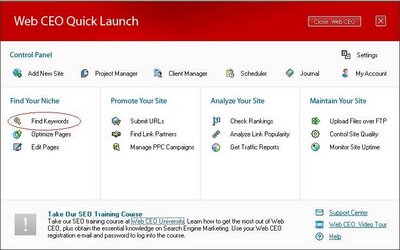
WebCEO Graphic User Interface
This will open the Project Selector, and if you have not done a project yet, you should click "New Site" (circled in red) and name your project. In my case, I have already done a project named "Natural Remedies" and therefore double-clicked on "Natural Remedies" (circled in red) (see screenshot below):
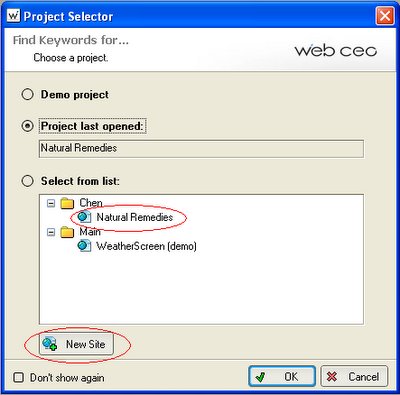
WebCEO Project GUI (graphic user interface)
A new window for Keyword Research will open, where I typed in the keywords I obtained from Overture. The tool gives me alternative keywords/phrases, daily world searches done for the search terms, number of competing sites, and the KEI (Keyword Effective Index) which is calculated as follows:

KEI = (DS^2/C) = (DS/C * DS), where DS is the number of daily world searches and C is the competition (number of search results) and have the following significance:

< 0.001 = Poor keyword 0.001-0.010 = Good Keyword 0.010-0.100+ = Excellent Keyword The higher the KEI ratio, the more popular your keywords are (more people are searching with those keywords), and the less competition they have (fewer websites come up as relevant results in search engine results pages). The results I obtained was as follows:


keyword/phraseDaily
world
search
CompetitionKEI
stroke symtoms95715000.126
stroke1,749669000000.046
stroke rehabilitation13414300000.013
caregivers410141000000.012
stroke recovery12916800000.010
stroke victims9911800000.008
stroke treatment12951500000.003
cause of stroke16699300000.003
stroke victim< 100< 0.001
stroke survivor< 100< 0.001
stroke rehabilitation advice< 100< 0.001
stroke recovery advice< 100< 0.001
jill bolte taylor< 100< 0.001
brain stroke< 100< 0.001
brain scientist< 100< 0.001
neuroanatomist< 100< 0.001


Thus WebCEO tells me that although more people search for "stroke recovery" than for "stroke rehabilitation", there are less sites competing for "stroke rehabilitation", etc. I thus gave more attention to "stroke rehabilitation", but included "stroke recovery" somewhere in my post as there are many people searching for it.

In my post, I will try to concentrate on the better keywords/phrases but not to the extend of making the post appear unnatural. In SEO, what one have to do is to try to include in the URL keywords/phrases. As the individual post page URL (permalink) is partly taken from the title of the post, I will therefore have to try to incorporate the better keywords/phrases into the title. I decided to make the title of the post "Stroke rehabilitation: Brain scientist stroke victim advice to stroke victims and caregivers". However, only a part of this long title will be incorporated into the URL. I therefore have to try to include the more important keywords into the headings in the posts and make some bold or as headings (<h2>). I decided that the post will start with a heading "Stroke and symtoms" with a description of what they are. This will be followed by another section "Stroke suffered by a brain scientist and her experience" and "Brain Scientist stroke victim and survivor advice to stroke victims and caregivers". The other secondary keywords will be scattered aroung the post.

There are more to that for a real professional SEO. For that, you will have to read WebCEO University course and do all it recommend. In the meantime, check the post at Stroke Rehabilitation: A Brain Scientist advice to stroke victims and caretakers.

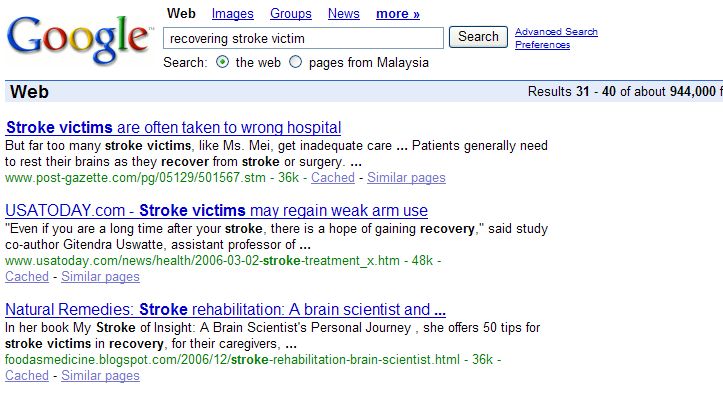
UPDATE 12 January 2007: I seldom check the statistics in my hit counter, but today I found some time to look through it and found a hit to Stroke Rehabilitation: A Brain Scientist advice to stroke victims and caretakers via Google search engine. The hit came from this search page (see screenshot. Click to enlarge):
Google search result page for 'recovering stroke victim'


Well, not bad, considering that the analysis showed that competition will be stiff and I didn't go all the way for really professional SEO.

Update 24 February 2007: Earnings from AdSense normally outperform that from Amazon, perhaps because I put Amazon ads in less visible places compared with AdSense. Today, I checked the Amazon report for this month, and I saw half of the books bought are connected with stroke. Just wondering if this better performance has anything to do with this less than professional SEO I did for that post on stroke mentioned in this post. If true, just wondering how much better it will be if I have the time to do a more professional job.
Continue reading →
Friday, September 22, 2006

How to get indexed by Google and othe search engines

0 comments
This question have been often asked by impatient bloggers on forums. Well, if you are patient, nowadays, you don't need to do anything, and your blog will eventually be indexed by Google and other search engines. However, it may take some time. If you are impatient, perhaps there are various things you can do.

The best thing you can do is to get inbound links from sites that have already been indexed by the search engines. Then when spider go to that site to crawl the site, it will come across you link and will go to you site to crawl it too. This will also do you good as having links to your sites will increase seaarch engine ranking. However, this is easier said than done unless you have your own site which has already been indexed. If you have no one to turn to to ask for inbound links, perhaps you can try to search for similar sites and offer to exchange links. For such purposes, it will be advantages to know the PageRank of the sites. See this post on how you can easily find the PageRank of your own site and any other sites: How to get the PageRank of your and other sites. (close the new window to get back to this page). Other ways to get links is to submit to blog directories.

Submit site to Directories


You can also submit your site to blog or other directories to get inbound links. To make your task easier, it is good to carefully prepare in advance title and a short description of your blog which you can use for all the directories, otherwise you will have to type it each time you try to submit your blog to a directory.

The best directory to get listed on is the Open Directory. To submit your site to Open Directory, go to How to suggest a site to the Open Directory. (Close the new window to get back to this page). Google, and many other search engines, uses the data of the Open Directory Project. In fact, Google Directory is taken from DMOZ, so if you get listed in DMOZ, your site is also listed in Google Directory. This means your site will have 2 high PageRank and authoritative site. However, it is VERY hard to get into the Open Directory. This blog got listed in DMOZ. You can read about it here: DMOZ, the most important directory, and Blogger Tips and Tricks got listed without even submitting (click BACK button to get back to this page).


It is easier to submit your blog to blog directories. There are many blog directories. Here are some blog directories:

(Close new windows to get back to this page)
Blog Catalog
Blogarama
Blogwise
Globe of Blogs
Bloggernity
Bloghop
Bloghub
Blog Universe

There are many other blog directories. When I have the time, I will compile them into a post and put a link here.

Submit URL to search engines


You can also submit your URL to search engines, but I hear they may not help much. Anyway, here are the links to the sites where you can submit your URL to search engines:
Submit your URL to Google
ExactSeek - Add your URl
Submit URL to Yahoo
MSN URL Submission

Add a Google Sitemap to your blog


Some are of the opinion that adding a Google sitemap will help your blog get indexed faster. In any case, adding a Google Sitemap to your blog has its advantages. It will make it easier for the spider to crawl your site. To get instruction on how to add a Google Sitemap to your blog, go to Adding a Google Sitemap to your blog. (Close the new window to get back to this page)

NEWER POST    OLDER POST
Continue reading →
Thursday, August 24, 2006

drive more users to your site and improve the visibility of the site content

0 comments
Google AdSense has some tips for AdSense users on how to drive more visitors to their sites and to improve the visibility of the site content. The include

  • Submiting all your pages to Google index

  • Find out how Google see your site

  • How to diagnose potential problems

  • How to find out which queries drive traffic to your site

  • If your site has disappeared from search results, how to get reincluded

To read more about it, go to A look inside Google AdSense.

NEWER POST    OLDER POST
Continue reading →
Related Posts Plugin for WordPress, Blogger...