Showing posts with label Blogger SEO. Show all posts
Sunday, May 20, 2012

Robots Meta Tag In Blogger

0 comments

The main use of adding the Robots Meta Tag In Blogger to determine which pages in your website can be indexed and not to be indexed by web spiders.This tag becomes useful when you use frames to navigate. The basic format of robotic meta tag is given below :

<meta content="index | noindex | follow | nofollow" name="robots" >

I think all of you have doubts with the robots tag. Its very simple to understand and use;

Index - Web Spiders will index your webpages
Noindex- Web Spiders will not index your webpages
robotic meta tag
Follow - Spiders will follow the link present in your website
Nofollow - Spiders will not follow the link present in your website

Using instructions :

If you had added the rel-no follow tags for all the links that had appeared on your posts, then use this code :

<meta content="index follow" name="robots">

In this manner the webspiders will index your main page and schedule to other pages that can be searched a hyperlink.

The below command will block webspiders from indexing pages and following links from your website.

<meta content="noindex nofollow" name="robots">

Continue reading →

Submit Your SItemap To Bing Webmaster Tools

0 comments

blogger, binglogo, codesblogThis post I explained the methods to how can Submit Sitemap To Bing Webmaster Tools. By adding sitemap to Bing Webmaster Tools will increase your search visibility in Yahoo and Bing.Bing takes 1 week to index your site with your sitemap.The supported sitemap formats in Bing are : Sitemap [ a .xml page of your websit], RSS 2.0, Atom 0.3, Atom 1.0 and text files.Now follow these steps to submit your sitemap.

Login to Bing Webmaster Tools [ Use your live id to login, you don't have crate one.]

Then submit your site url to Bing

After verification of your website

Click on the web url appeard there [ http://www.domain.com]

Then click on Crawl

Then select Sitemaps [Atom, XML, RSS]

Then a window will appear and add your feed link or sitemap link with .xml as sitemap

Then click on submit

Finish !!!

Wait for a week and after that bing will index your site.

gadgets, codesblog, bing sitemap

bing sitemap submisiion


Continue reading →
Saturday, May 19, 2012

Adding Meta Tags To Blogger Updated 2012

0 comments
Add Meta Tags to your blogger page good.But how to add these tags in blogger.And what are tags I add to my blogger. Actually its very simple to add meta tags to blogger.This will help to increase your search visibility also.When the search visibilty increases your SEO Ranking also increase.That will increase your bloger traffic and more income from your blogger.Now a days Google change its algorithms!! So adding the mets tags also important.Add these meta tags in very simple steps.

Login to Blogger.com
Edit HTML
Press Cntrl + f and search
<b:include data='blog' name='all-head-content'/>
Place the following below codes after the above code

<meta content='Blog Title Here' name='title'/>
<meta content='Description' name='description'/>
<meta content='Keywords Here' name='keywords'/>
<meta content='Blog Author Name' name='author'/>
<meta content='INDEX,FOLLOW' name='robots'/>

INDEX - bot will index
NOINDEX - bot will no index
NoFOLLOw - not follow links
FOLLOW - follow links

<meta content='INDEX,FOLLOW' name='robots'/>

Change this as your wish.
As per new Google Algorithm  , Google not supports keywords. But other search engine supports this.

Below there is a Meta Analyser to Analyis your site ;


Meta Tag Analyzer


Check your meta tags!


example: http://www.host.com

URL


(optional)

User Agent * (optional)


Please enter the access code as displayed above.

Access code

Online Meta Tag Analyzer
provide by SEOCentro.

Continue reading →
Wednesday, May 9, 2012

Google Snippets Tool Error Fixing | missing hfeed entry and hcard author

0 comments
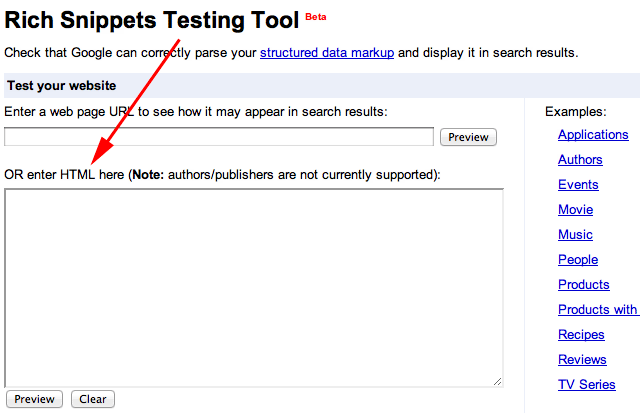
imageWhen we looks your website search result in Google Snippet Tools Beta some times it shows a error code mentioned below in the post. This error is common and I will give you a complete solution to solve the problem.

Rich Snippets Testing Tool


hfeed hentry Warning: Missing required field "updated". Warning: Missing required hCard "author"

While testing your website, in Google Rich Snippets Tool beta, the possiblity is higher to get an error like this
Rich Snippets Testing Tool


Warning: Missing required field “updated”
Warning: Missing required hCard “author”

I am giving solution for this. Just follow these steps :

Find this code in your blogger template : <div class='blog-posts hfeed'> .

Replace this code to : <div class='blog-posts'>

Find this code : <div class='post hentry'>

Replace this code to : <div class='post'>

Find this code : <div class='post hentry uncustomized-post-template'>.

Replace this code to : <div class='post uncustomized-post-template'>
 Save the template.
After save the template and again submit your url to Snippet after 2mins. Then it shows any error please post a comment.

Continue reading →
Thursday, May 3, 2012

Check Your Page Rank Instantly │ Check Your Google Page Rank

0 comments

Did you heard about Page Rank ? Literally Google Page Rank just the rank of your page in Google index.Google sets your page rank accourding to your traffic.Not completely by your blog traffic its also search the quality of your content also.Google likes only unique and quality contents.If you are a copy content blogger don't waste your time by check the page rank.Now the Panda update is run by the Google to improve the search result optimization.Be unique..

By the below tool you can check your Google Page Rank Instantly

google page rank

Check Page Rank 


This page rank checking tool is powered by Page Rank Checker service
Continue reading →
Wednesday, May 2, 2012

Change Blog Title For SEO Ranking │Blogger Title SEO

0 comments

seo
If you have seen many blogs appear on the search results. But notice one thing that most of the blog search results are shown like this “post title : blog title” this is because they optimize their blogger title for good SEO. Default blogger title tags ,blog title is shown before the post title. This may affect your SEO Ranking. Perform better in SERP’sit should be given your post title rather than blog title. In short you must use “ Post title:Blog title” for best SEO Ranking and results.
image

For optimizing the blog title you must follow these steps;


• Go to your Blogger  Account

• Choose the Blog that you want to optimize

• Click on Templates

• Edit  HTML ( proceed any way)

• Put tick mark on Expand Widget

• Press Ctrl + F to search

<title><data:blog.pageTitle/></title>

Replace the above code with this code :

<b:if cond='data:blog.pageName == ""'><title><data:blog.title/></title><b:else/><title><data:blog.pageName/> │<data:blog.title/></title></b:if>
Continue reading →
Monday, April 23, 2012

Adding Meta Description In Blogger│A Complete SEO

0 comments
There are so many ways to optimize your Blog for better search results and SEO. In this post I describe about the best way of adding meta description and Best Blogger SEO.I saw that most of the Blogger uses are putting description on their templates by adding


<meta content='YOUR DESCRIPTION ' name='description'/>
In my opinion this is not a right way to optimize your blog .For right way to optimize your blogger is

1. Login to Blogger Account ( This will appear on New Blogger Interface)
2. Go to Dashboard for your Blogger
3. Settings à Search Preferemces à Meta Tags à Description

Here add your blogs correct description
Then check your Blog Posts  there added a new option called search description
There add your posts seach description.
This will help you to add your Blogger Posts in extended links

click on the image to view large


search description


Continue reading →
Related Posts Plugin for WordPress, Blogger...